The Booking Form widget is a powerful, multi-step booking system designed specifically for pest control businesses. It allows customers to schedule appointments, select services, and submit their information seamlessly.
Key Features
| Feature | Description |
|---|---|
| Multi-Step Process | 4-step booking flow (Date/Time → Services → Information → Confirmation) |
| Real-Time Availability | Checks available time slots dynamically |
| Service Integration | Pulls services from your Service post type |
| Emergency Option | Special handling for urgent requests |
| reCAPTCHA Support | Spam protection with Google reCAPTCHA |
| Mobile Responsive | Works perfectly on all devices |
| Customizable Styling | Full design control via Elementor |
Adding the Booking Form Widget
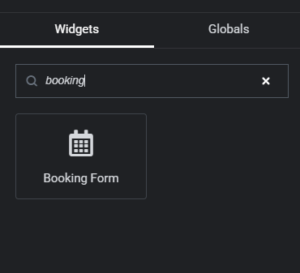
Step 1: Locate the Widget
-
Edit any page with Elementor
-
Search for “Booking Form” in the widgets panel
-
Or look under “PestAnnihilate” category
-
Drag and drop onto your page
Widget Configuration – Content Tab
Layout Section
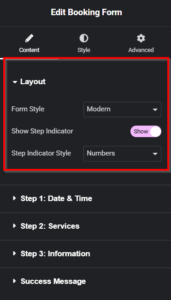
| Setting | Options | Description |
|---|---|---|
| Form Style | Modern, Classic, Minimal | Overall form appearance |
| Show Step Indicator | Yes/No | Display step progress |
| Step Indicator Style | Numbers, Icons, Simple | How steps are shown |
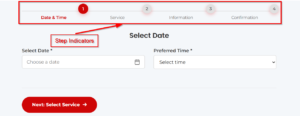
Step 1: Date & Time Settings
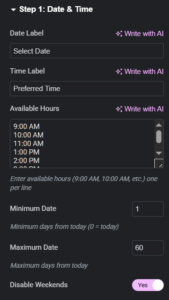
| Setting | Default | Description |
|---|---|---|
| Date Label | “Select Date” | Label for date field |
| Time Label | “Preferred Time” | Label for time field |
| Available Hours | 9:00 AM – 4:00 PM | Time slots (one per line) |
| Minimum Date | 1 | Days from today |
| Maximum Date | 60 | Days from today |
| Disable Weekends | Yes | No weekend bookings |
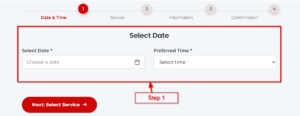
Step 2: Services Settings
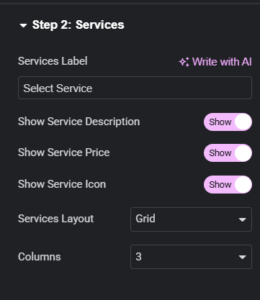
| Setting | Options | Description |
|---|---|---|
| Services Label | “Select Service” | Section title |
| Show Service Description | Yes/No | Display service excerpt |
| Show Service Price | Yes/No | Show price |
| Show Service Icon | Yes/No | Display icon |
| Services Layout | Grid, List, Carousel | How services appear |
| Columns | 1-4 | Grid columns (if grid selected) |
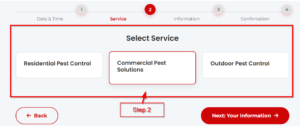
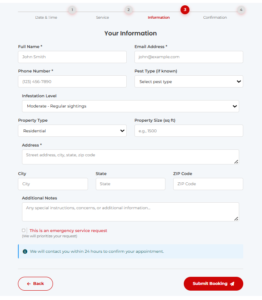
Step 3: Information Settings
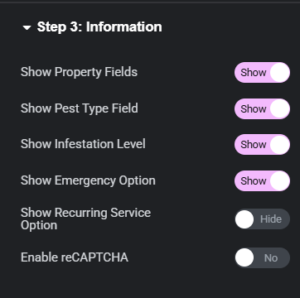
| Setting | Description |
|---|---|
| Show Property Fields | Address, city, state fields |
| Show Pest Type | Dropdown of pest types |
| Show Infestation Level | Light/Moderate/Severe options |
| Show Emergency Option | Special checkbox for urgent |
| Show Recurring Option | For ongoing service interest |
| Enable reCAPTCHA | Spam protection |
Success Message Section
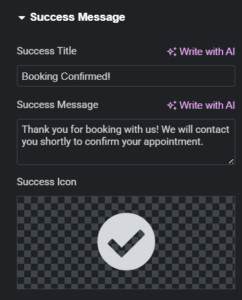
| Setting | Default |
|---|---|
| Success Title | “Booking Confirmed!” |
| Success Message | “Thank you for booking…” |
| Success Icon | Checkmark circle |
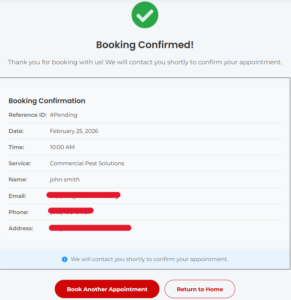
What happens:
-
Booking saved to database
-
Confirmation email sent (if configured)
-
Admin notified of new booking
-
Summary displayed to customer
Managing Bookings (Admin)
Accessing Bookings
Dashboard → Bookings
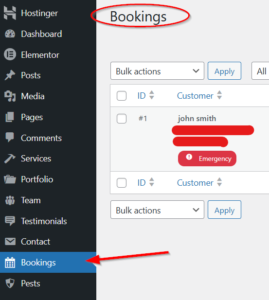
Bookings List View
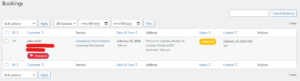
Booking Statuses
| Status | Description | Color |
|---|---|---|
| Pending | New booking, not confirmed | 🟡 Yellow |
| Confirmed | Approved by admin | 🟢 Green |
| Completed | Service done | 🔵 Blue |
| Cancelled | Booking cancelled | 🔴 Red |
Admin Actions
| Action | What it does |
|---|---|
| Confirm | Approve booking, send confirmation email |
| Edit | Modify booking details |
| Delete | Remove booking (permanent) |
| View | See full booking details |
Setting Up Email Notifications
Add to your theme’s functions.php or use a code snippet plugin:
// Booking email settings
function pestannihilate_booking_email_settings() {
    return [
        'admin_email' => get_option('admin_email'),
        'subject' => 'New Booking Received - {service}',
        'template' => 'emails/booking-confirmation.php',
        'from_name' => get_bloginfo('name'),
        'from_email' => get_option('admin_email')
    ];
}
Database Structure
-- Bookings table structure
CREATE TABLE wp_pestannihilate_bookings (
    id INT AUTO_INCREMENT PRIMARY KEY,
    customer_name VARCHAR(255) NOT NULL,
    customer_email VARCHAR(255) NOT NULL,
    customer_phone VARCHAR(50) NOT NULL,
    service_id INT,
    service_name VARCHAR(255),
    booking_date DATE NOT NULL,
    booking_time VARCHAR(50) NOT NULL,
    address TEXT,
    city VARCHAR(100),
    state VARCHAR(50),
    zip_code VARCHAR(20),
    pest_type VARCHAR(100),
    infestation_level VARCHAR(50),
    property_type VARCHAR(50),
    notes TEXT,
    is_emergency TINYINT DEFAULT 0,
    is_recurring TINYINT DEFAULT 0,
    status VARCHAR(50) DEFAULT 'pending',
    created_at DATETIME DEFAULT CURRENT_TIMESTAMP,
    updated_at DATETIME ON UPDATE CURRENT_TIMESTAMP
);
Frequently Asked Questions
Q: Where are bookings stored?
A: Bookings are stored in a custom database table wp_pestannihilate_bookings and also as custom post types.
Q: Can customers cancel their own bookings?
A: By default, cancellations are handled by admin. You can add customer cancellation via custom development.
Q: Does it work with WooCommerce?
A: The booking system is independent but can be integrated with WooCommerce for paid bookings (custom development required).
Q: How do I export bookings?
A: Use the export button in the Bookings admin page (CSV format).
Q: Can I sync with Google Calendar?
A: This requires additional development. Contact us for integration services.