Location
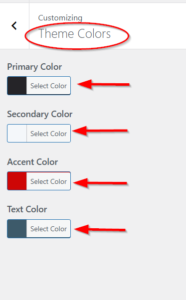
Appearance → Customize → Theme Colors
Overview
Control the main color scheme of your website. These colors sync with Elementor’s global colors.
🎨 Available Color Settings
| Setting | Default | Description |
|---|---|---|
| Primary Color | #252428 |
Main brand color (headers, backgrounds) |
| Secondary Color | #f4f7fa |
Secondary backgrounds, sections |
| Accent Color | #ce0606 |
Call-to-action, emergency buttons, highlights |
| Text Color | #3D5A6A |
Body text color |
How to Change Colors
-
Go to Appearance → Customize
-
Click on Theme Colors
-
Click on any color to open the color picker
-
Choose your color:
-
Use the eyedropper to pick from anywhere
-
Enter HEX code (e.g.,
#ce0606) -
Use RGB or HSL values
-
-
Changes preview in real-time
-
Click Publish to save
Elementor Integration
These colors automatically appear in Elementor