Location
Appearance → Customize → Logos
Overview
Upload different logos for different sections of your website. All logos support transparent PNG and SVG formats.
🖼️ Logo Settings
| Setting |
Default |
Description |
| Main Logo |
None |
Header logo (desktop) |
| Main Logo Width |
250px |
Adjust size |
| Sticky Logo |
None |
Logo when header sticks |
| Sticky Logo Width |
160px |
Smaller for sticky header |
| Footer Logo |
None |
Logo in footer |
| Footer Logo Width |
180px |
Footer logo size |
How to Upload Logos
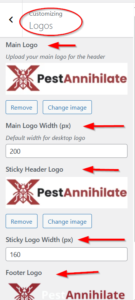
Step 1: Prepare Your Logo
Step 2: Upload Main Logo
-
Go to Appearance → Customize → Logos
-
Click Main Logo → Select Image
-
Choose from Media Library or Upload New
-
Click Select
-
Adjust width using number field
-
Preview changes
Step 3: Upload Sticky Logo (Optional)
-
Scroll to Sticky Header Logo
-
Click Select Image
-
Upload smaller version of your logo
-
Set width (usually smaller than main)
Step 4: Upload Footer Logo (Optional)
-
Scroll to Footer Logo
-
Click Select Image
-
Upload logo for footer
-
Set width