Location
Appearance → Customize → Typography
Overview
Control the fonts used throughout your website. Choose from 10+ Google Fonts optimized for pest control websites.
🔤 Available Fonts
| Font | Best For |
|---|---|
| Montserrat | Modern, clean look (Default body) |
| Poppins | Geometric, professional (Default headings) |
| Inter | Excellent readability |
| Roboto | Neutral, friendly |
| Open Sans | Highly readable |
| Nunito | Soft, rounded |
| DM Sans | Modern, minimal |
| Work Sans | Clean, professional |
| Raleway | Elegant, stylish |
| Onest | Contemporary |
Settings
Body Font
-
Font Family: Choose from dropdown
-
Font Weight:
-
Light (300)
-
Regular (400)
-
Medium (500)
-
Semi Bold (600)
-
Bold (700)
-
Heading Font
-
Font Family: Choose from dropdown
-
Font Weight:
-
Regular (400)
-
Medium (500)
-
Semi Bold (600)
-
Bold (700)
-
Extra Bold (800)
-
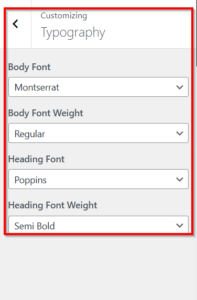
How to Change Fonts
-
Go to Appearance → Customize → Typography
-
Select Body Font from dropdown
-
Select Body Font Weight
-
Select Heading Font from dropdown
-
Select Heading Font Weight
-
Watch live preview update
-
Click Publish
📱 Responsive Behavior
-
Fonts automatically adjust for mobile
-
No need to set separate mobile sizes
-
All fonts are optimized for all devices