What Are Custom Post Types?
Custom Post Types (CPTs) extend WordPress beyond posts and pages. PestAnnihilate includes several CPTs specifically for pest control businesses:
| CPT | Purpose |
|---|---|
| Services | Individual pest control services |
| Team | Staff/professional profiles |
| Pests | Pest library/information |
| Portfolio | Project showcases |
Where to Find Them
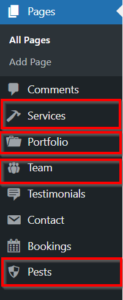
After installing PestAnnihilate, you’ll see new menu items in your WordPress admin:
Dashboard
├── Posts
├── Pages
├── Services     ← New!
├── Team         ← New!
├── Pests        ← New!
├── Portfolio    ← New!
└── Appearance
📝 Quick Reference: Meta Box Locations
| Post Type | Meta Boxes | Location |
|---|---|---|
| Page | Page Settings | Sidebar |
| Page Customizer Overrides | Below content | |
| Service | Service Settings | Below content |
| Team | Team Member Details | Below content |
| Professional Skills | Below content | |
| Pests | Pest Information | Below content |
| Portfolio | Portfolio Settings | Below content |
| Project FAQs | Below content |
❓ Frequently Asked Questions
Q: Do I need to use all custom post types?
A: No, use only what you need. Unused CPTs don’t affect your site.
Q: Can I add custom fields to these CPTs?
A: Yes, using Meta Box plugin you can add more fields.
Q: Will my data be lost if I update the theme?
A: No, all meta data is stored in database and survives updates.
Q: Can I create custom archives for each CPT?
A: Yes, use Elementor Theme Builder to design custom archive pages.
Q: How do I display CPTs in menus?
A: Go to Appearance → Menus, you’ll see each CPT under “View All” tabs.